

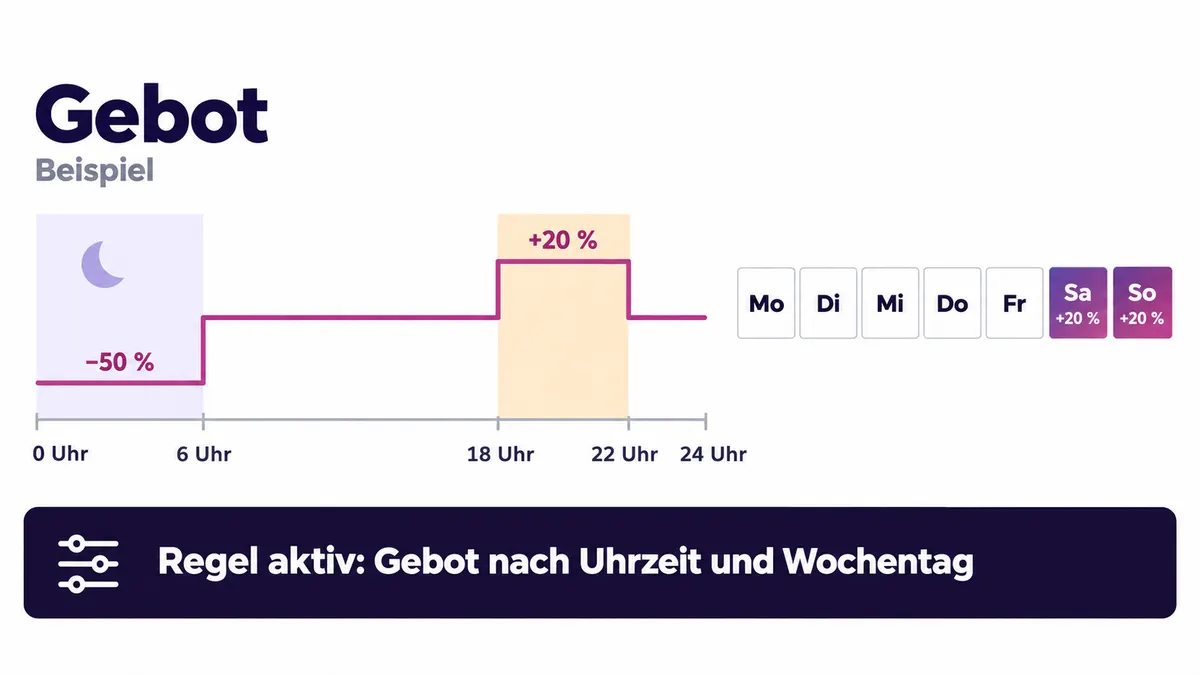
You control Amazon bids by time of day and weekday by defining clear conditions in PPC-Butler: at which time of day and on which weekday a bid is raised, lowered or paused. The rules take effect automatically, and you can always see which rule took effect when.
What does control by time of day and weekday achieve?
Optimise your bids at any time manually, at the push of a button or automatically by time of day and weekday. This flexibility allows you to adapt your advertising strategies to the dynamics of the market and to react flexibly to changes in real time. This is how you maximise your efficiency and increase the success of your advertising in the long term.
Many campaigns on Amazon run 24/7, i.e. continuously and without regard to the actual buying behaviour of the target group. As a result, budgets are also used up at night or during phases with a low probability of conversion.
Example rule: bids by time of day and weekday
- IF time between 6 pm and 10 pm OR Saturday/Sunday → THEN bid +20%.
- IF time between midnight and 6 am → THEN reduce the bid by 50%.
More on this in the article Managing Amazon campaigns outside office hours.
Who is the feature for?
For agencies
This flexibility allows you to adapt your clients’ advertising strategies precisely to the dynamics of the market and to react flexibly to changes in real time. This is how you increase the efficiency of your clients’ campaigns and ensure lasting success, which improves client satisfaction and strengthens a long-term partnership with your agency.
For freelancers
This is how you can increase your efficiency and improve the results for your clients without any additional effort. This allows you to concentrate on other important tasks and still deliver excellent results.
For sellers and vendors
You can set the interval of the adjustments entirely according to your needs – from hourly adjustments to yearly adjustments, all options are available to you.
What the tool does for your situation is shown on the pages for agencies, freelancers and sellers and vendors.
PPC-Butler and other PPC tools compared
This is how it stands in the comparison PPC-Butler vs. other PPC tools:
- Interval – PPC-Butler: Hourly, daily, weekly, fixed date, every year on and more.
- Interval – other PPC tools: Mostly technologically restricted, sometimes via the Amazon data stream, but then no control of Sponsored Brands and Display Ads possible.
From the update log
These new features from the update log fit this topic:
- Dayparting V2: more room for rules by time of day and weekday: Dayparting rules work with an improved logic. The new logic extends what you can control by time of day and weekday.
- Recognise on which weekday and at which hour your ads perform: A heatmap sets weekday against hour – for campaigns, portfolios, products, ad groups, keywords, targets and placements. You switch between conversions, sales, spend and ACOS. A colour legend, click-to-highlight and the current hour marked in the profile’s time zone make it easy to read.