

You control Amazon campaign budgets automatically with a budget workflow in PPC-Butler. A workflow is a fixed rule that you set up once. After that it runs on its own: it gives a campaign more budget when it pays off. If it does not pay off, it gets less. The workflow can also spread a small budget across the whole day. Amazon’s own budget rules can only raise budgets. Here you can read what you can set in Amazon and where a workflow helps.
How does Amazon handle the daily budget?
At Amazon the daily budget is not a fixed limit for each single day. Amazon works with an average over the whole calendar month. In the advertising console you choose under Settings how much extra Amazon may spend on a single day: up to 25% or up to 100% more. With a daily budget of 40€, that means up to 50€ or up to 80€ on one day. The extra money comes from days on which the campaign spent less than its daily budget (Amazon Ads).
Our recommendation: check this setting right away and choose 25%. That way a single day can go less far beyond the daily budget, which gives you more control over your spend.
Once a campaign’s budget is used up, Amazon says its ads only show again after midnight. A small budget can be gone within minutes when many shoppers click on the ads. On the “Budgets” page (beta) Amazon suggests suitable budgets. In campaign manager you see a notice when a budget is used up (Amazon Ads).
What can Amazon’s own budget rules do?
Amazon offers two types of budget rules (Amazon Ads):
- On a schedule: they raise the budget in advance by a fixed percentage, for example for Prime Day or for a period you choose yourself.
- By performance: they raise the budget only when a metric reaches a certain value. For Sponsored Products, according to Amazon, these are ACOS, click-through rate or conversion rate. The campaign needs a daily budget of at least 10 USD for this (Amazon Ads). For Sponsored Brands there are more metrics, for example ROAS (Amazon Ads).
A quick word on the terms: ACoS tells you what percentage of your sales you spend on ads. ROAS is the reverse: how much in sales each euro of ad spend brings in.
Both types of Amazon rules go in one direction only: more budget. Lowering a budget, switching a campaign off in the evening or spreading a small budget across the day is not part of any Amazon description.
What does PPC-Butler control for budgets?
PPC-Butler has its own workflow for budgets. It can raise a campaign’s daily budget, lower it or set it to a fixed amount. It never drops below the minimum budget you set in your settings.
What the workflow can look at:
- How much of today’s budget is already gone, in percent: this shows you campaigns that are almost empty early in the day.
- All campaign numbers, for example sales, orders or ACoS: for today, the current month, the last 30 days or a period you choose, such as the last 7 days.
- What has happened since the last budget change: the workflow only changes the budget again once enough new numbers have come in.
- Time of day and weekday: the workflow can adjust the budget per weekday or switch a campaign off and on again at certain hours.
The heatmap: when do your campaigns perform well?
The heatmap in PPC-Butler is a coloured table with the days of the week and the hours of the day. At a glance you see at which times your ads perform well and when they do not. You can display the heatmap by conversions, sales, spend or ACoS. It is available for single campaigns and for single products.
You can look up every budget change later: the campaign history shows which workflow triggered it, when that was and what the budget was before and after.
Three example workflows for your budget
The values are examples, not Amazon guidance. In this example we count an ACoS above 20% as high.
1. A good campaign runs out of budget early
IF more than 80% of today’s budget has been spent AND the ACoS of the last 7 days is below 20% AND there were at least 5 orders in those 7 days, THEN budget +20%.
A campaign that sells well gets more budget this way, before it runs out by noon.
2. High ACoS: check the heatmap first, then control by time of day
If a campaign’s ACoS is above 20%, less budget is not automatically the best solution. First check the heatmap: at which hours and on which days is the ACoS high? Then build the workflow from that:
- Switch the campaign off in the evening and on again in the morning if the late hours cost money but bring hardly any sales.
- Adjust the budget per weekday if certain days perform clearly worse.
3. Stretching a small budget across the day
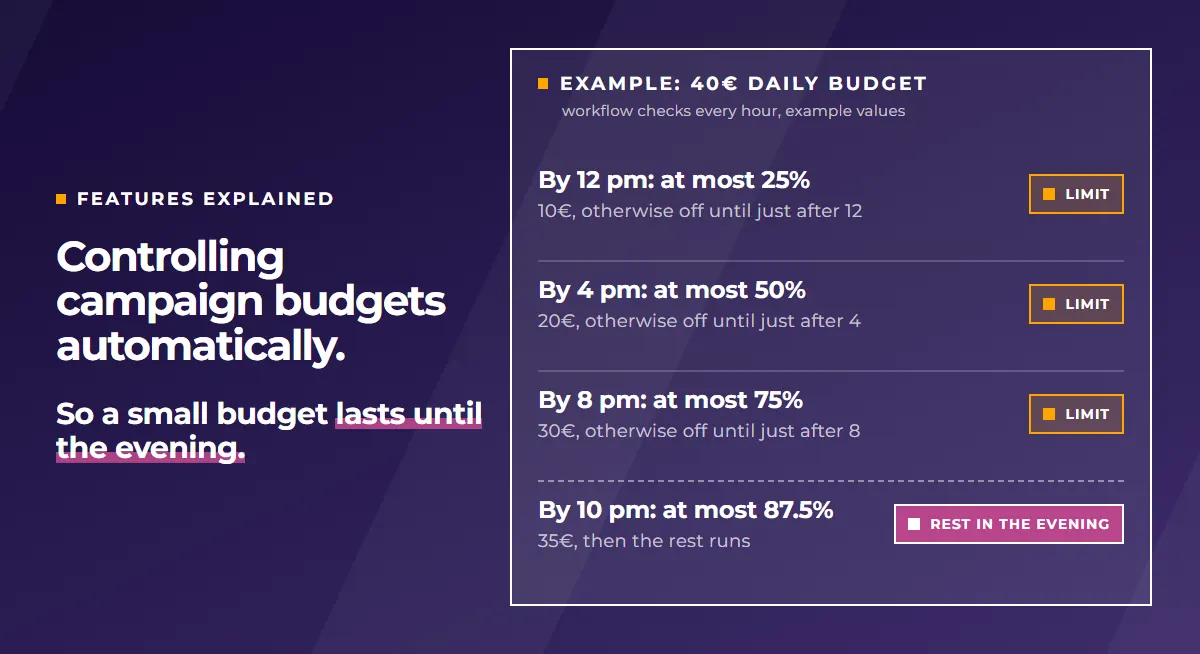
An example with a daily budget of 40€. The only goal here is that the budget is not used up by mid-morning. The workflow checks every hour and splits the day from 8 am to 10 pm into four blocks:
| By | Spent at most | Otherwise |
|---|---|---|
| 12 pm | 25% (10€) | switch off, switch on again shortly after 12 pm |
| 4 pm | 50% (20€) | switch off, switch on again shortly after 4 pm |
| 8 pm | 75% (30€) | switch off, switch on again shortly after 8 pm |
| 10 pm | 87.5% (35€) | switch off, switch on again from 10 pm |
After 10 pm the campaign keeps running with what is left, at least 5€. The limits are in percent. That way the same workflow fits any budget, whether 40€ or 400€.
Two things to know: Amazon may spend more than the daily budget on a single day. Switching off is therefore the actual limit here. The workflow checks every hour. A limit can therefore be exceeded by up to one hour of ad spend.
Who is this feature for?
For agencies and freelancers
Set up a budget workflow once and use it in all your clients’ accounts. Your client asks why the budget was higher yesterday? The history shows which workflow changed it, when, and from which amount to which.
For sellers and vendors
Campaigns that sell get more budget without you checking every day. Campaigns that only cost money in the evening switch off in the evening. A small budget lasts until the evening.
What the tool does for your situation is shown on the pages for agencies, freelancers and sellers and vendors.
From the update log
These updates from the update log fit this topic:
- Your own product values for the budget: values you store per product (for example the margin) can also be used for budgets.
- Numbers of whole portfolios: if your portfolios are sorted by product, you base the budget on the whole product, not just one campaign.
- Changing many campaigns at once: filter campaigns and raise, lower or set the budget in one step. Each of these changes can be undone.
Related features
For the basics of controlling budgets with rules, read Controlling ad budget automatically and dynamically.