How do I control Amazon bids by time of day and weekday?
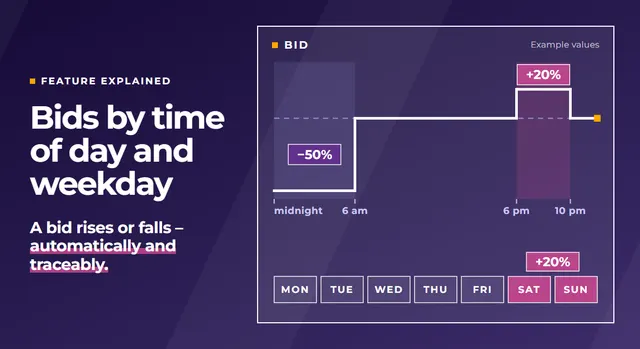
Controlling Amazon bids by time of day and weekday: in PPC-Butler you decide when a bid rises or falls. Automatically and traceably.
Read article

PPC-Butler features explained
In the PPC-Butler features explained category, we show you how to use the full potential of our rule-based system: transparent, traceable and tailored to your requirements. Whether trigger logic, rule combinations, portfolio control or API connection: we explain step by step how individual features work, what they bring and how to integrate them into your Amazon PPC strategy. These articles are for everyone who wants to go deeper and not just “automate somehow”, but scale in a targeted and controlled way, without relying on opaque black box systems.
PPC-Butler features explained
Controlling Amazon bids by time of day and weekday: in PPC-Butler you decide when a bid rises or falls. Automatically and traceably.
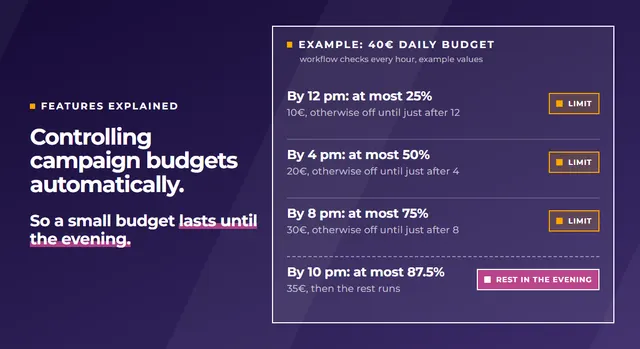
Read articleAmazon only raises budgets by date or by metric. In PPC-Butler the budget goes up and down according to your workflows, by time of day too. Every change is logged with its reason.
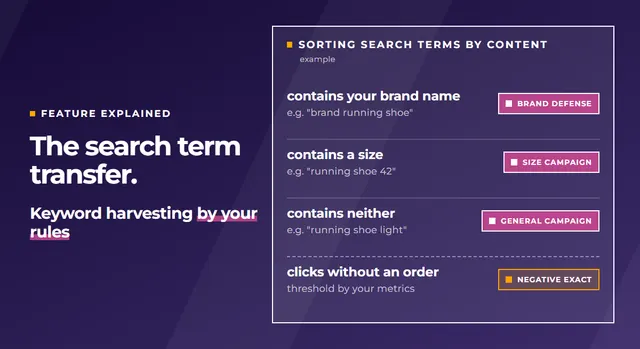
Read articleAutomating keyword harvesting on Amazon: PPC-Butler transfers search terms into all ad types according to your KPIs, from SP to SB and back, or negates them.
Read articleRead on
New updates, features and improvements of the PPC-Butler, and the story behind them: why we develop a feature and which problem it solves.
How Amazon PPC works in practice: scenarios from product launches and portfolio management to rule-based campaign automation.
Best practices with PPC-Butler: from rule-based bidding strategies and keyword analyses to dynamic budget control.
All articles at a glance: advertising strategies, practical tips for campaign optimisation and concrete use cases with the PPC-Butler.