

You automate keyword harvesting on Amazon in PPC-Butler with the search term transfer: your Butler transfers search terms into all existing ad types based on the KPIs you define. You can harvest or only negate, from every ad type to every ad type. Automatically or only after your approval. This works with any campaign structure: the Butler adapts to your setup, not the other way round.
What does the search term transfer do?
Your PPC-Butler can transfer search terms fully automatically into all existing ad types based on the KPIs you define, for example from Sponsored Products (SP) to Sponsored Brands (SB) or from Sponsored Display Ads (SDA) to Sponsored Products (SP). There are no limits to your strategy, whatever your campaign structure.
In the Amazon advertising console you can only look back 65 days at search terms. After that, it often remains unclear how many clicks and orders a search term has brought in total. Your Butler adds up all data records for you from the moment you sign up. You choose the time window for your rule freely: from today back to the start of data recording.
Sorting search terms by content
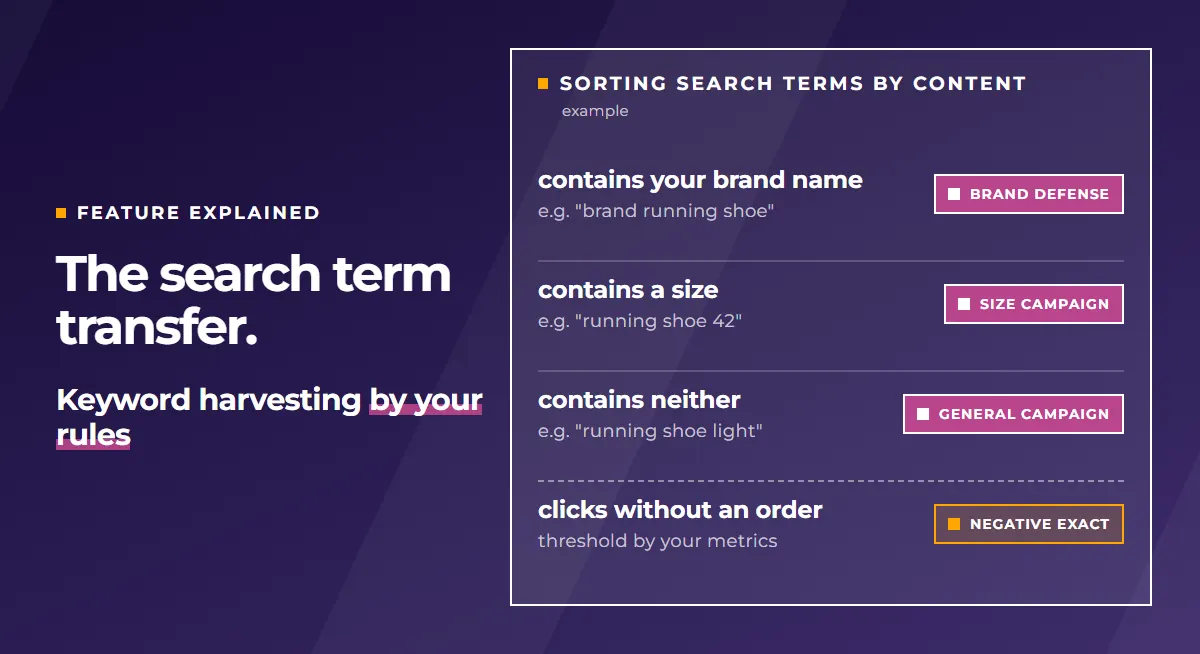
Not every good search term belongs in the same campaign. That is why you can define where a search term is transferred depending on its content:
- If the search term contains a specific word, for example your brand name, a size such as “XL” or a colour, your Butler transfers it into the campaign you have assigned for it.
- If it does not contain it, it goes into another campaign of your choice.
This way, search terms with your brand name go straight into your brand defense campaign, search terms with a size into the matching size campaign and all others into your general campaign. Your campaign structure stays clean without you sorting every term by hand.
Search term mining and negative management
The harvest workflow is especially practical. It helps you move successful search terms from broader campaigns cleanly into more targeted campaign structures. At the same time, unsuitable search terms can be negated.
- Real search terms can be analyzed per ad group.
- Terms with clicks but no orders can be identified.
- Your Butler sets negative keywords at ad group level, as negative exact or negative phrase.
- Existing negatives are taken into account, so there is no duplicate maintenance.
- Performing search terms can be moved into manual campaigns.
You decide how much happens automatically. You set up the transfer in a workflow. You can run it automatically on a schedule. Your Butler then transfers the changes straight to Amazon. Or you have the result presented to you in the Butler and confirm it by hand. Before that, you delete whatever you do not want. Only what you approve is sent to Amazon. Many users choose the second route because they want to see beforehand what would happen.
When a search term should be negated and at which level is explained in the article Negating Amazon search terms without sales. More about the harvest workflow on the page about the PPC-Butler MCP.
Who is the feature for?
For agencies
There are no limits to your team’s creative strategy, whatever campaign structure you develop for your clients. Your Butler adds up all data records from the moment you sign up, so your team has a long-term view as well. Keyword harvesting for brand defense, competitors and much more.
For freelancers
There are no limits to your strategy, whatever campaign structure you have developed for your clients. This comprehensive data basis enables you to make well-founded decisions that improve the performance of your clients’ campaigns in the long term.
For sellers and vendors
This way you can deliberately influence events that lie more than 65 days back. You steer your campaigns even more precisely. This comprehensive data basis enables you to make well-founded decisions that improve your campaign performance in the long term.
What the tool does for your situation is shown on the pages for agencies, freelancers and sellers and vendors.
PPC-Butler compared with other PPC tools
This is how it stands in the comparison PPC-Butler vs. other PPC tools:
- Search term transfer, PPC-Butler: From every ad type to every ad type (SP -> SB; SB -> SP). Harvest or only negate, or also: search term contains “brand”, then move it to SP brand defense.
- Search term transfer, other PPC tools: Not very flexible, not across ad types.
From the update log
These new features from the update log fit this topic:
- Protect new targets before a clean-up rule catches them: The metric targetCreated tells you how old a target is. This lets you build up new targets more deliberately and not pause them too early. If you clean up your account regularly by rule, simply exclude freshly created keywords from the rule.
- Treat newly harvested keywords separately
- Distinguish manually added targets from freshly transferred ones