

You find duplicate search terms on Amazon with one question to your AI. The PPC-Butler MCP connects your AI assistant, such as Claude or ChatGPT, to your PPC-Butler account.
This is how it works:
- Your AI shows you the numbers for each campaign side by side.
- You decide which campaign keeps the term.
- The Butler creates a job. It excludes the term in the other campaigns.
- You check every change. Only your confirmation applies it.
- A fixed workflow then prevents new duplicates.
What are duplicate search terms?
In the search term report, the same search term sometimes shows up in several campaigns. Each row has its own cost, its own orders and its own ACoS. ACoS tells you what percentage of your sales you spend on advertising.
A search term only counts as a duplicate if the campaigns advertise the same product.
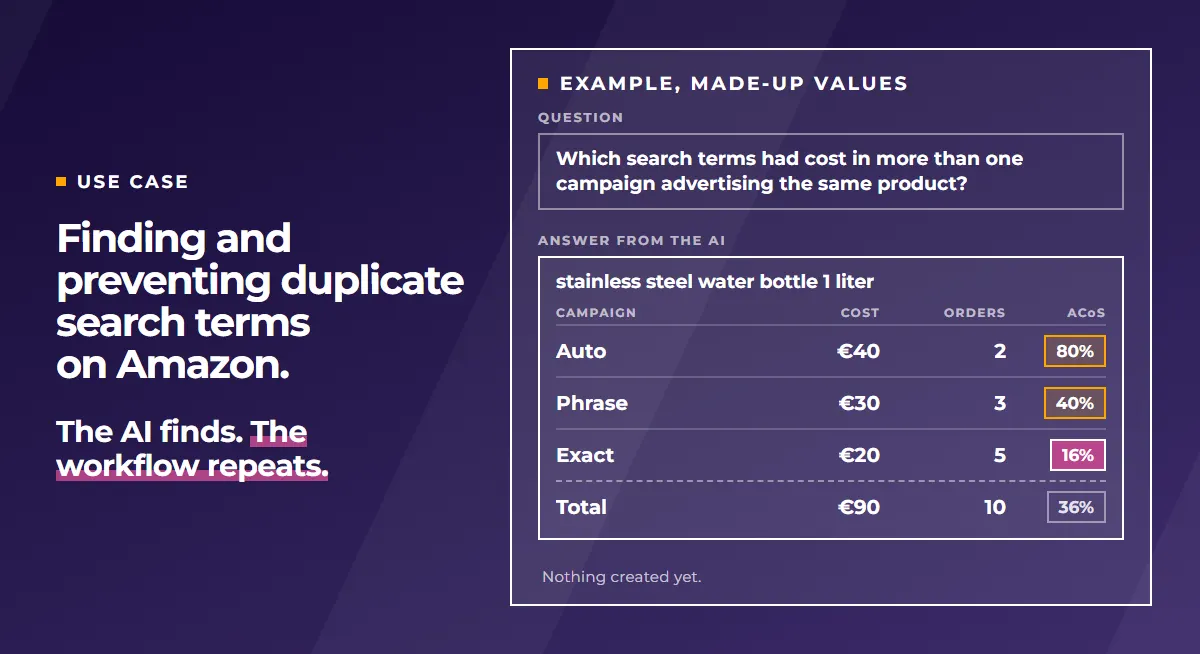
The table shows a made-up example: one search term in three campaigns, with very different ACoS.
| Campaign for “stainless steel water bottle 1 liter” | Cost | Orders | Sales | ACoS |
|---|---|---|---|---|
| Auto | €40 | 2 | €50 | 80% |
| Phrase (broad) | €30 | 3 | €75 | 40% |
| Exact | €20 | 5 | €125 | 16% |
| Total | €90 | 10 | €250 | 36% |
In this example, we count an ACoS above 20% as high.
If you only see the total, you see 36%. But the exact campaign is at 16%. The auto campaign is at 80%.
A workflow calculates per campaign. It only sees its own part. In our assessment, it can be too careful in the exact campaign. The auto campaign then keeps spending money on the same term.
Am I bidding against myself with several match types?
Are you bidding against yourself when one keyword runs in several match types? No, according to Amazon you are not. In its guide to targeting with Sponsored Products, Amazon writes that “you won’t be bidding against yourself by adding different match types on the same keyword.”
The sentence only covers match types of the same keyword. Amazon says nothing about an automatic and a manual campaign with the same search term.
The problem is a different one: no campaign owns the term. Cost and orders are split across several campaigns. None of them shows you the whole picture.
Amazon itself advises aligning your advertising tactic with the way you measure it. A search term in three campaigns has three measurements instead of one.
In our experience, this makes advertising more complicated than it needs to be. You lose the overview. As in the example above, money can end up in the campaign with the worst ACoS.
Where do duplicate Amazon search terms come from?
They come from a setup that Amazon itself recommends: automatic and manual campaigns side by side.
Amazon also advises testing all three match types. Exact gets the highest bid, broad the lowest.
Amazon also recommends moving the best search terms from the automatic campaign into manual campaigns. According to Amazon, you bid more competitively there. Whether the automatic campaign keeps getting the term afterwards, Amazon does not say in that place.
In our assessment, the term then keeps running in both campaigns. That only ends with a negative in the automatic campaign.
How do I find duplicate search terms?
You look for search terms with cost in more than one campaign. The campaigns advertise the same product. By hand, you go through the search term report row by row.
With your AI, it is one question in plain language. There is no ready-made report for this. Your AI does the matching.
- The question goes back to the start of data recording in PPC-Butler. Depending on how long you have been with us, that is several years.
- This also works with very large amounts of data.
- Your AI leaves out terms you have already excluded.
An example question for your AI:
Check my Amazon.de profile across the whole stored history for search terms that had cost in more than one campaign advertising the same product. Leave out terms that are already excluded in the other ad groups. For each term, show me the campaigns side by side: cost, orders, sales, ACoS and whether the term is booked there as exact match. For each term, suggest which campaign keeps it: the exact one, if it brings more orders at a lower ACoS over a few weeks, otherwise no change. Don’t create anything yet. I decide, then you prepare the job.
For agencies: the same question works across all marketplaces and client accounts, if your clients have agreed.
Which campaign keeps the search term?
The AI assistant shows the numbers, you decide. Our recommendation: the exact campaign keeps the term if it brings more orders at a lower ACoS over a few weeks. Otherwise exclude nothing and keep watching.
Amazon supports this indirectly: according to Amazon, exact match tends to drive the highest conversion rates. Also evaluate a keyword only after at least 20 clicks. That is what Amazon advises.
Negative keywords: excluding the term in the other campaigns
This is how you go about it:
- Negative exact: this way the negative hits exactly this search term.
- In the ad group, not in the whole campaign: a negative for the whole campaign applies to all its ad groups. It would also hit the group with the exact keyword. That is our recommendation, Amazon allows both.
- In automatic campaigns too: negative keywords work there just the same.
In PPC-Butler this runs as a job. The Butler creates it with all negatives. It checks the whole list before creating anything. You see every change. Nothing goes to Amazon before you confirm. That gives you certainty. Afterwards every change is in the history.
For large changes there is also the CSV import, for example to rename many campaigns at once. After a finished job you can set bids, status, budgets, placements and names back to their previous values.
When a negative makes sense for search terms without orders is covered in the article Negating Amazon search terms without sales.
Preventing new duplicates: one workflow, the same every week
You clean up once with your AI. To keep new duplicates from appearing, you don’t need to ask again every week. Instead you set up a workflow that holds your rules in the pattern IF this, THEN that. Your Butler runs these rules at the interval you choose. That ranges from hourly to yearly. You don’t need an AI for that.
In short: the AI finds. The workflow repeats.
In PPC-Butler, the search term transfer does this:
- It transfers a proven search term as its own keyword.
- It excludes it in its source ad group, as negative exact or negative phrase.
- It takes terms you have already excluded into account.
- It sends the changes to Amazon on a schedule. If you like, you review and confirm first.
A rule with example values that you set yourself:
- IF orders of the search term (since data recording) ≥ 2 AND ACoS of the search term (since data recording) ≤ 20% → THEN transfer as exact keyword into the target campaign and add as negative exact in the source ad group.
More in the article Automating Amazon keyword harvesting.
Who is this for?
For sellers and vendors running automatic and manual campaigns side by side. For agencies and freelancers with many client accounts. There the check by hand is especially tedious. Negative keywords and match types are available in the ad console.
Amazon also has its own MCP server. According to Amazon, it is in open beta for partners with active API credentials. The difference is explained in the article Amazon Advertising MCP. The PPC-Butler MCP is included in every plan.
Sources
- Amazon Ads, guide “Targeting with Sponsored Products”: advertising.amazon.com
- Amazon Ads, guide “Keyword targeting”: advertising.amazon.com
- Amazon Ads, MCP server in open beta, 02/02/2026: advertising.amazon.com