

You automate keyword harvesting on Amazon by defining once which metrics make a search term a proven one. A workflow then transfers it as its own keyword into a campaign you can control precisely. In PPC-Butler, the search term transfer does this: based on your metrics, from any ad type to any ad type, automatically or only after your approval.
Read on for what is behind it, what Amazon itself recommends and what such a rule looks like.
What is keyword harvesting?
In auto campaigns as well as with broad and phrase keywords, your ad also appears for search terms you did not book yourself. Some of them sell well. Keyword harvesting means “harvesting” exactly these search terms: they are added as their own keywords to a campaign where you control them individually.
The counterpart are search terms that bring clicks but no orders. Those you add as negatives. When that makes sense is covered in the article Negating Amazon search terms without sales.
What does Amazon recommend?
Amazon describes how automatic and manual campaigns work together in its guide to targeting with Sponsored Products. Four points matter for harvesting:
- Collect data first: Amazon recommends running an automatic campaign for about two weeks before creating a manual campaign.
- Use the search term report: According to Amazon, the search term report of your automatic campaigns shows which keywords or products you should target in your manual campaign. You add the top-performing targets to your manual campaigns to bid more competitively on them.
- Exact match: It is the most restrictive match type and, according to Amazon, tends to drive the highest conversion rates. For manual bids, Amazon recommends the highest bid for exact match, a lower one for phrase and the lowest for broad match.
- Patience after the transfer: Amazon advises testing match types for at least one to two weeks before pausing keywords. According to Amazon, adding several match types for the same keyword does not make you bid against yourself.
What Amazon does not define is the threshold: when a search term counts as “top-performing” is up to you.
Why is a keyword of its own worth it?
As long as a search term only runs through a broad keyword or automatic targeting, it shares that bid with many other search terms. As its own keyword it gets its own bid and its own metrics. You control every target individually, whatever your campaign structure.
When does a search term count as proven?
A single order can be chance. A threshold made of two conditions makes more sense:
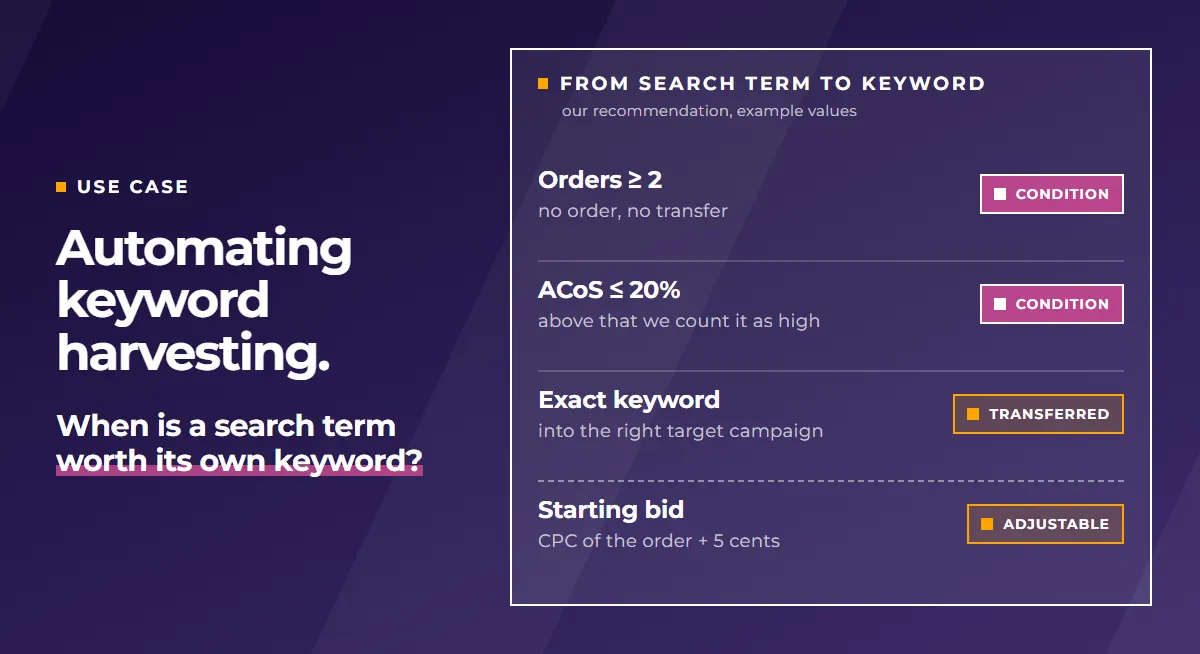
- Orders: a minimum number in the period you look at, for example two.
- Profitability: an ACoS below your target. In our articles, an ACoS above 20% counts as high. If your margin is clearly higher or lower, set your own limit.
For search terms with low search volume, it takes a while to reach this threshold. In the Amazon Ads console you only see search terms for the last 65 days. What a rare search term has brought in overall then often remains unclear. PPC-Butler adds up the data from the moment you sign up. You choose the period freely, from today back to the start of data recording.
Where does the search term go?
That depends on your campaign structure. The transfer adapts to it, not the other way round. Typical paths:
- from an auto campaign into a manual campaign with exact keywords,
- from one ad type into another, for example from Sponsored Products to Sponsored Brands,
- by content: if the search term contains your brand name, it goes into your brand defense campaign. If it contains a size such as “XL”, it goes into the size campaign. All others land in your general campaign.
More on the feature page Search term transfer across all ad types.
How do you set this up in PPC-Butler?
In PPC-Butler you set up the search term transfer in a workflow. You define:
- the metrics and the period, for example orders and ACoS since the start of data recording,
- the target campaign, optionally depending on what the search term contains,
- the starting bid of the new keyword. We recommend the CPC that led to the order plus 5 cents,
- the source: your Butler can add the harvested search term there as a negative, either negative exact or negative phrase.
We would not transfer a search term without orders and without an ACoS limit. Only both together show that a term sells and pays off. You can let the workflow run automatically on a schedule. Your Butler then sends the new keywords straight to Amazon. Or you have the result presented in the Butler and confirm it manually. Before that you delete whatever you do not want. Only what you approve goes to Amazon.
Freshly harvested keywords have no data of their own yet. A rule that pauses weak keywords or lowers their bid would hit them too early. The metric targetCreated tells you how many days a target has been running. With it you exclude new keywords from such rules for their first weeks. If a harvested keyword later becomes too expensive, the article Lowering Amazon bids at high ACoS automatically helps.
Example rules: transferring proven search terms as keywords
- IF orders of the search term (since data recording) ≥ 2 AND ACoS of the search term (since data recording) ≤ 20% → THEN transfer the search term as an exact keyword to the target campaign, starting bid = CPC that led to the order + 5 cents, add it as negative exact in the source ad group.
- IF the search term contains your brand name → THEN transfer it to the brand defense campaign, otherwise to the general campaign.
The numbers in these rules are example values, not an Amazon recommendation. Period, minimum orders, ACoS limit, starting bid and target campaign are up to you, matching your campaign structure and your goal for each product.