

A search term without an order costs money with every click. How long you keep watching should not depend on gut feeling, but on two figures for your product: the margin and the conversion rate. If you capture the threshold as a rule, every search term is judged by the same standard.
This article shows how to derive the threshold from both figures, what Amazon itself recommends for negative keywords, at which level to exclude and how PPC-Butler handles it automatically or only after your approval. It also shows how AI helps you spot unsuitable search terms even before the threshold.
Why do search terms without sales cost money?
With Sponsored Products, you pay when a shopper clicks on your ad (Amazon Ads: cost per click). You book a keyword or a target. Your ad, however, is served on search terms, meaning what shoppers actually type in. Especially with auto campaigns and with broad and phrase keywords, these include terms you would never have booked yourself.
If such a search term does not fit your product, shoppers click but do not buy. Every one of these clicks costs budget. A negative keyword excludes the term: your ad no longer appears for it.
Which threshold is the right one?
A single click without an order says nothing. If you negate too early, you exclude terms that would have sold with a little more data. If you wait too long, you keep paying for clicks with no return. One fixed number for all products therefore does not fit. Two yardsticks help:
By conversion rate: How many clicks does your product need on average for one order? At a conversion rate of 10 %, it is ten. A search term with two to three times that, so 20 to 30 clicks and no order, stands out. The lower your conversion rate, the more clicks a search term needs before you judge it.
By margin: What does a sale earn you before advertising costs? If a search term without an order has already caused more advertising costs than this amount, even the first order would no longer have made up for the loss. An example: a sale brings €12 margin, a click costs €0.60 on average. After 20 clicks without an order, the €12 are spent.
Together, both yardsticks give a good picture. A product with a high margin can take more clicks without an order, with a tight margin you act sooner. All numbers here are example values, calculate with your own.
The time window matters too. In the Amazon advertising console you can only look back 65 days at search terms. PPC-Butler adds up the data from the moment you sign up, so a long-term view is possible as well.
What does Amazon recommend for negative keywords?
Amazon describes negative targeting in its guide to targeting with Sponsored Products. Four points matter for your search terms:
- Match type: Amazon recommends phrase or exact match for negative keywords. Negative phrase excludes search queries that contain the complete phrase or very close variants. Negative exact excludes the exact phrase or a very close variant.
- Level: Negative keywords can be added for the entire campaign or for selected ad groups.
- Patience: Amazon advises testing different match types for at least one to two weeks to collect enough data before pausing keywords. An auto campaign should run for about two weeks before you build a manual campaign from it.
- Products instead of terms: With product targeting you can negate individual ASINs. Your ad will then not appear on their product page.
For individual search terms without sales, negative exact is the more cautious route. Negative phrase reaches further: a term chosen too short can also lock out search queries that do sell.
At which level should you negate?
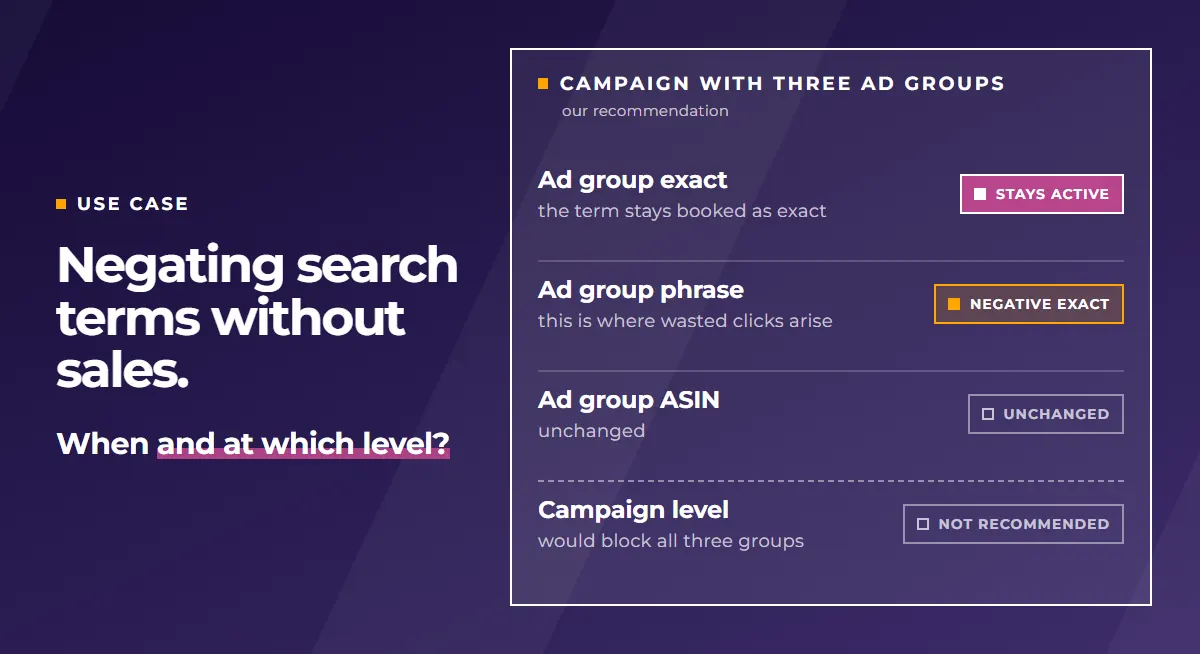
Many accounts are set up like this: one campaign with three ad groups, one each for exact keywords, phrase keywords and ASINs. If you negate a search term at campaign level here, the exclusion applies to all three ad groups. That locks the term out of the ad group in which you may be booking it as exact match right now.
In our view, the ad group is therefore usually the better level. In the structure described, we recommend negating only in the phrase ad group. That is where the unsuitable search terms come from, while the exact booking stays in place. If you prefer, you can negate in all three ad groups, but not at campaign level.
Stepping in earlier: suggestions via the PPC-Butler MCP
A threshold needs data. Some search terms, however, clearly do not fit your product, and you can tell after the very first click. That is what the PPC-Butler MCP is for. It connects your account to an AI language model such as Claude or ChatGPT.
The AI looks at your product and assesses the search terms, even if they have only one click so far: does the term fit the product or not? The result is a list of suggestions. On request, the AI also drafts a rule from it that you run once. This lets you switch off unsuitable search terms before they have cost much budget. What gets negated is your decision.
How do you implement this in PPC-Butler?
In PPC-Butler this is part of the search term transfer: you can harvest search terms or only negate them. You define:
- the metrics, for example clicks, cost and orders of the search term, plus the selling price and conversion rate of the product or your own product variables,
- the time window, freely selectable from today back to the start of data recording,
- the match type of the negative keyword, exact or phrase.
Your Butler sets negative keywords at ad group level. Existing negatives are taken into account, so there is no duplicate maintenance.
You decide how much happens automatically. You combine your rules in a workflow. You can run it automatically on a schedule. Your Butler then transfers the changes straight to Amazon. Or you have the result presented to you in the Butler and confirm it by hand. Before that, you delete whatever you do not want. Only what you approve is sent to Amazon. Many users choose the second route because they want to see beforehand what would be negated.
If a keyword does sell but is too expensive, the article Lowering Amazon bids automatically at high ACoS will help.
Example rules: negating search terms without an order
In PPC-Butler you do not have to calculate the threshold for every product separately. The rule reads the product’s metrics itself.
By conversion rate:
- IF clicks on the search term (since start of data recording) ≥ 2 × 100 ÷ conversion rate of the product AND orders from the search term (since start of data recording) = 0 → THEN add the search term as negative exact in the phrase ad group.
The conversion rate used is the product’s rate since the start of data recording. At 8 % this gives 25 clicks, at 20 % it is 10. If a product has no order yet, there is no conversion rate. Then a value you store yourself as a product variable applies, for example a target conversion rate per ASIN.
By price:
- IF cost of the search term (since start of data recording) ≥ 20 % of the selling price AND orders from the search term (since start of data recording) = 0 → THEN add the search term as negative exact in the phrase ad group.
The idea behind it: if a search term without an order has already cost more than a fifth of the price, even the first order would come in at an ACoS above 20 %. From this limit on, we speak of a high ACoS. If you maintain your margin as a product variable, you can use the margin of one sale as the limit instead.
Factor, percentage and time window are example values, not a recommendation from Amazon. Adjust them to your product, your margin and your conversion rate. Whether the workflow transfers to Amazon on its own on a schedule or first presents the result for your confirmation is also up to you.