

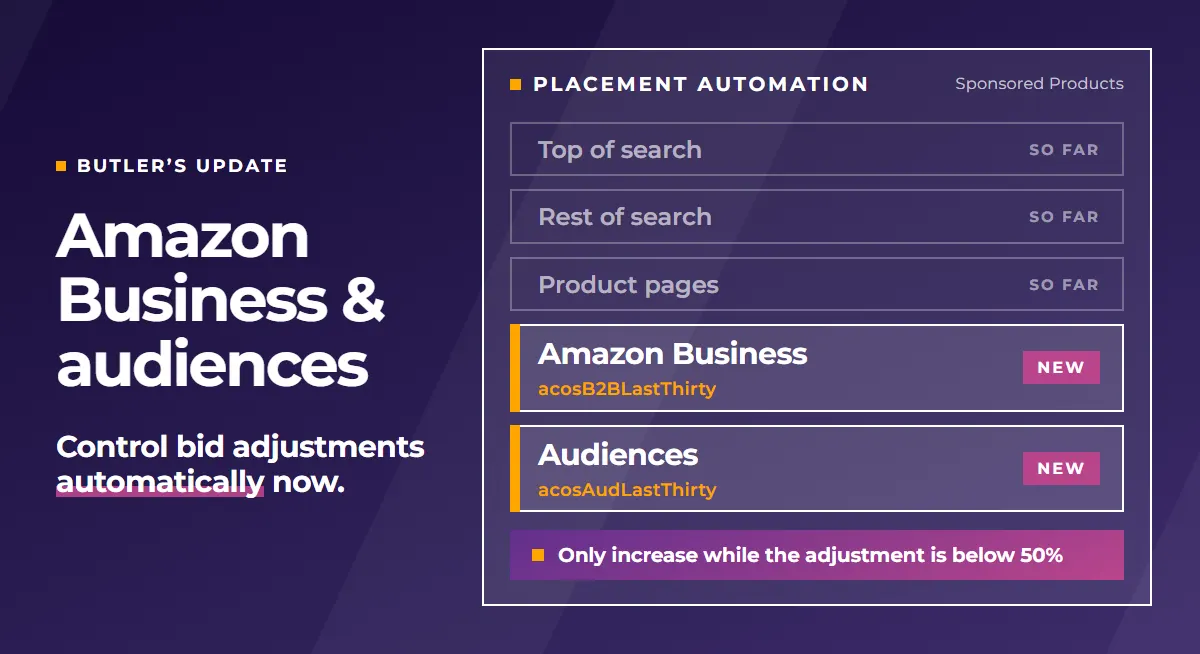
In PPC-Butler, you now control the bid adjustments for Amazon Business and for audiences just as automatically as top of search, rest of search and product pages: with a placement automation that looks at the numbers of this placement itself. If business customers buy via Amazon Business at a good ACoS, the rule raises the bid adjustment for Amazon Business. If an audience becomes too expensive, it lowers that audience’s bid adjustment. And it does so on every run, following the same settings you define once.
Two levers that used to sit outside your automations now follow your rules as well.
What is new in PPC-Butler?
The update brings three new features for your Sponsored Products campaigns:
- Two new placement types. When you create an automation, choose “Amazon Business placements” or “Audiences” under placement type.
- Separate KPIs in formulas. ACoS, ROAS, CTR, conversion rate, CPC, clicks, impressions, spend, sales, orders and units are available separately for Amazon Business and for audiences, in keyword and target rules too.
- The current bid adjustment as a condition. Your rule checks how high the adjustment currently is, for example: only increase while it is below 50%.
Why is it worth controlling Amazon Business and audiences separately?
A bid adjustment applies to the whole campaign. If you judge it by the campaign average, you cannot see how these particular buyers respond: business customers may convert much better or worse than everyone else, and an audience may pay off or burn money.
With separate KPIs per placement, your butler judges Amazon Business and audiences by their own numbers. It increases where it pays off and scales back where it gets too expensive. You know the principle from TOS, ROS and PDP, and now it applies to these two as well.
How do you set up an automation for Amazon Business or audiences?
- Open Placements in the menu and create an automation.
- Under placement type, choose “Amazon Business placements” or “Audiences”.
- Set the conditions, such as ACoS, clicks or sales. They refer to exactly the selected placement.
- Set the action. It adjusts the bid adjustment of this placement.
Good to know: audiences are only controlled if an audience is already set up on the campaign. That is one audience per campaign.
Which KPIs are available for Amazon Business and audiences?
The names follow a fixed pattern: the KPI, then B2B for Amazon Business or Aud for audiences, then the time range. acosB2BLastThirty is the ACoS of the Amazon Business placement over the last 30 days, acosAudLastThirty is the same value for the audience.
| KPI | Amazon Business | Audiences |
|---|---|---|
| ACoS | acosB2BLastThirty |
acosAudLastThirty |
| ROAS | roasB2BLastThirty |
roasAudLastThirty |
| CTR | ctrB2BLastThirty |
ctrAudLastThirty |
| Conversion rate | crB2BLastThirty |
crAudLastThirty |
| CPC | cpcB2BLastThirty |
cpcAudLastThirty |
| Clicks | clicksB2BLastThirty |
clicksAudLastThirty |
| Impressions | impressionsB2BLastThirty |
impressionsAudLastThirty |
| Spend | spendB2BLastThirty |
spendAudLastThirty |
| Sales | salesB2BLastThirty |
salesAudLastThirty |
| Orders | ordersB2BLastThirty |
ordersAudLastThirty |
| Units | unitsB2BLastThirty |
unitsAudLastThirty |
Instead of LastThirty you can also use the other time ranges you know from your rules: Today, Month, Life, your own ranges Custom1 to Custom3, and Change. Change counts since the last change of the bid adjustment.
You read the adjustment currently set with businessPercentage for Amazon Business and audiencePercentage for audiences.
Example rules for Amazon Business and audiences
All figures in these rules are example values. You set thresholds, click counts, waiting periods and step sizes yourself.
1. Expand Amazon Business when business customers pay off
- Placement type: Amazon Business placements
- IF ACoS (last 30 days) < 20% AND clicks (last 30 days) ≥ 15 AND current adjustment < 50% AND the last change of the adjustment was at least 7 days ago → THEN increase the adjustment by 10 percentage points.
- As a formula: condition
businessPercentage < 50, actionplacementPercentage + 10.
2. Scale back an audience when the ACoS is too high
- Placement type: Audiences
- IF ACoS (last 30 days) > 20% AND clicks (last 30 days) ≥ 15 AND the last change of the adjustment was at least 7 days ago → THEN lower the adjustment by 20%.
- As a formula: action
placementPercentage * 0.8.
How does the PPC-Butler MCP help you?
You do not have to write the formulas yourself. Using the PPC-Butler MCP, you discuss in plain language with your AI assistant what should happen with Amazon Business and your audiences: from which ACoS should the adjustment rise, where is the upper limit, how long should it wait after a change?
The MCP provides the matching conditions and formulas. These are suggestions, your butler does not apply them by itself. You check the suggestion and set it up in your automation with a few entries.
How do you stay in control?
You see every change an automation makes to a campaign in the Butler dashboard, in the campaign’s history, together with the rule that was responsible for it: time, the triggering workflow and rule, old and new value. The history can be filtered by placement.
You can also query the same history via the PPC-Butler MCP, for example by asking your AI assistant which rule last changed the bid adjustment for Amazon Business. And if a rule has gone too far after all: one click and everything is undone.
You can find all new features at a glance in the update log. We look forward to your feedback.