

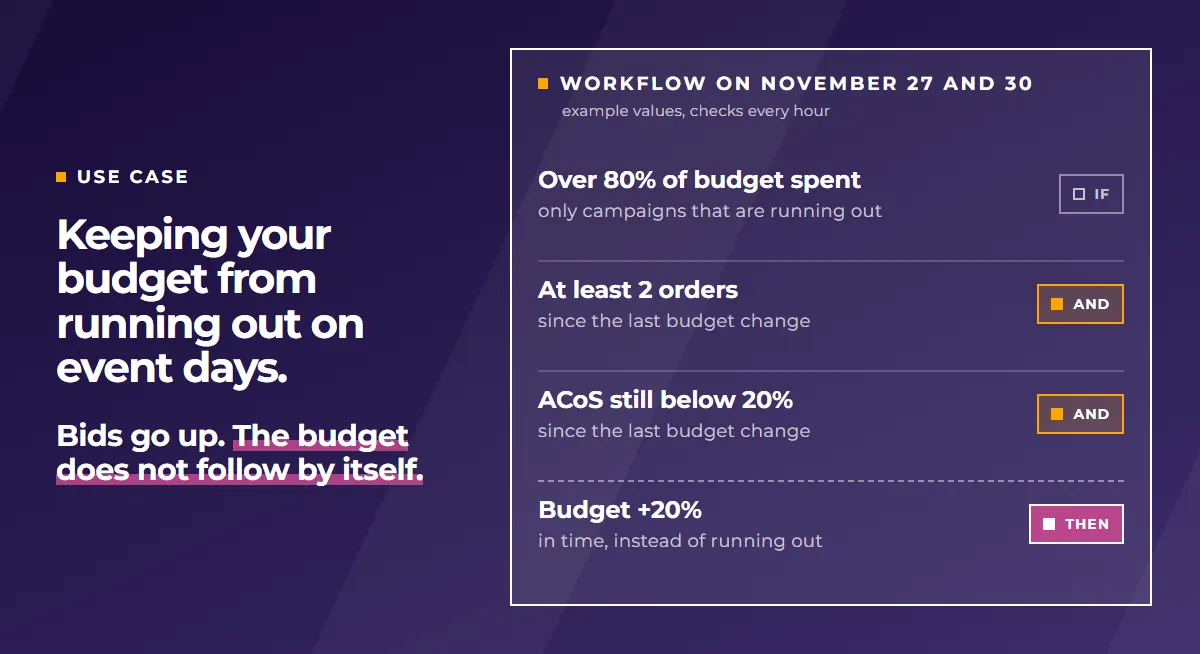
To keep your Amazon budget from running out during the day on Black Friday (November 27) and Cyber Monday (November 30), plan it together with your bids. Amazon spends daily budgets as quickly as possible. According to their description, Amazon’s bid rules raise bids, so the budget needs a rule of its own. In the ad console that is a schedule based budget rule. In PPC-Butler it is a workflow that keeps raising the budget only if at least 2 orders came in since the last budget change and the ACoS stayed good. ACoS tells you what percentage of your sales you spend on ads. Everything here applies to Prime Day just the same.
What happens when the budget runs out?
Once a campaign’s budget is used up, its ads are not eligible to show again “until the next day, at midnight when the daily budget resets”, according to Amazon. A smaller budget can be used up within minutes if many shoppers interact with the advertised products (Amazon Ads).
Amazon itself warns about this for exactly this week. In its Black Friday Week guide for sellers, published in the German Seller Central forum, Amazon tells sellers not to let their campaigns run out of budget on peak days.
Why is raising your bids not enough?
Amazon does not spread the daily budget across the day. According to Amazon, daily budgets are spent as quickly as possible.
In the same Black Friday Week guide, Amazon recommends two things: raise the bids for your best performing Sponsored Products campaigns, and match your ad budget to your deal schedule. For higher bids, the ad console has schedule based bid rules. They raise bids at certain times of day, on certain weekdays and within date ranges. They have been available for Sponsored Products since November 2023 (Amazon Ads). Since January 2025 you can also pick events with high shopper traffic there, meaning days when many shoppers buy. You find them under “Settings” when you add a new bid rule (Amazon Ads).
What is new is where Amazon offers these rules. In the German ad console we saw Amazon suggest them right when you create a Sponsored Products campaign. In the section “Additional changes” there is an optional item “Automated tasks through rules”, marked as beta. Its suggestion reads, in our translation: “Change bid based on a schedule. Increase your bids for high traffic days.” There was no mention of budget in this rule.
Our view: Amazon’s description of bid rules does not mention the budget, they change bids. If you only raise your bids for the event days, you do not get a higher budget with them. The budget needs a rule of its own.
What should you do before November 27?
1. Sort first: which campaign gets more budget?
More budget only pays off for campaigns that use up their budget and get conversions with it, meaning sales from the ads. If a campaign uses up its budget without conversions, check bids, targeting and the product detail page first. If that does not help, lower its budget and give it to campaigns that sell. This is how Amazon describes it in its budget guide.
2. Set up a budget rule for the event days
In the ad console, a schedule based budget rule raises the budget by a percentage you choose, within a date range you set. For the event days that is November 27 to 30. Amazon’s own example is raising the budget by 100% on Black Friday. How much it should be for you is your decision.
To be honest: for a simple raise on the event days, this budget rule from Amazon is enough.
3. Plan bids and budget together
Do you raise bids with a bid rule, on a schedule or through the new beta when creating a campaign? Then set up a budget rule for the same campaigns and the same days at the same time.
4. Check the overspend setting
At Amazon, your daily budget is not a fixed limit for each single day. Amazon may spend more on one day if less was spent on earlier days of the month. Over the month, it stays at the daily budget on average.
An example: your daily budget is 100€. With the 25% setting Amazon may spend up to 125€ on a single day, with 100% up to 200€. The money for that comes from days on which less than 100€ was spent. You choose the setting in the ad console, it applies to all campaigns at once (Amazon Ads).
We still recommend 25%, on Black Friday and Cyber Monday too. The setting affects all campaigns, a budget rule only the campaigns you pick. So it is better to give more budget to individual campaigns, with a budget rule or a workflow.
5. Review after November 30
The “Budgets” page (beta) in the ad console shows estimated missed sales, impressions and clicks plus a recommended budget. Amazon notes that these estimates cannot be guaranteed. After that, review your budgets at least once every two weeks, as Amazon recommends (Amazon Ads).
How does this work in PPC-Butler?
PPC-Butler has a workflow just for budgets. You set up a workflow once. It holds your rules in the form IF this, THEN that. Your butler then runs them.
A budget workflow can raise, lower or set a campaign’s daily budget to a fixed amount. It never goes below the minimum budget you set in the settings. What the workflow can look at:
- how much of today’s budget is already spent, in percent
- all campaign numbers for a time range of your choice, for example the last 7 days
- what has happened since the last budget change
- time of day and weekday
As its schedule you can choose a fixed date, then the workflow runs only on those days. A budget workflow can check every hour. More on the feature in the article Controlling Amazon campaign budgets automatically.
The values in the examples below are examples, not Amazon’s recommendation. In this example we treat an ACoS above 20% as high.
Example 1: more budget on event days, only with good numbers
- When: on November 27 and November 30, with a fixed date as schedule. On those days the workflow checks every hour.
- What to check: More than 80% of today’s budget is spent. Since the last budget change at least 2 orders came in, and their ACoS has stayed below 20% since the last budget change. (In short: 80% of the daily budget used up, at least 2 orders whose ACoS stays below your target.)
- What to do: budget +20%.
You set all the numbers yourself: how much of the budget must be spent, your ACoS target, the number of orders and how much more budget.
The key part is looking at what happened since the last budget change. Amazon’s performance based budget rule works with ACOS, click-through rate and conversion rate of the last 7 days (Amazon Ads). The workflow also looks at what has happened since the last budget change: did at least 2 orders come in? Has the ACoS stayed good? Only then does it add more budget.
This way the workflow can adjust the budget every hour on the event days, but only when profitable orders come in. Profitable here means: the ACoS is below your target. A campaign that sells like this gets more budget in time instead of running out. This way you make sure you don’t leave profitable sales on the table because your campaign went out of budget. In client accounts we see that this also helps organic ranking, meaning your product’s position in the search results without ads.
What happens without this check? A rule that only works with the last 7 days can keep raising the budget even though the new orders are already unprofitable. The ACoS of those 7 days still looks good then. A workflow that checks every hour could add 20% several times on the same day without this check. Without the 80% condition it would also give more budget to campaigns that are not running out at all.
Example 2: stretching the budget across the day
So the budget is not used up by the morning, a workflow can release it in steps. It sets the daily budget to a fixed amount by time of day. With a 100€ daily budget it could look like this:
| When | Daily budget |
|---|---|
| in the morning | 25€ |
| 4 hours later | 50€ |
| 8 hours later | 75€ |
| 12 hours later | 100€ |
This way only 25€ may be spent every 4 hours. You stretch the 100€ across the day, and your ads stay visible all day long. You set the times and amounts yourself, the workflow checks once an hour for this.
Amazon bid rule or workflow: one way per campaign
If an Amazon bid rule controls a campaign, Amazon’s automation takes priority. A third-party tool cannot control the bids of that campaign then. So choose one way for each campaign: Amazon’s bid rule or a workflow in PPC-Butler. How to control bids by time of day and weekday in PPC-Butler is shown in the article Controlling Amazon bids by time of day and weekday.
Every change on record
The campaign history shows which workflow triggered a budget change, when that was and what the budget was before and after.
If you prefer to work by hand, filter your campaigns and raise, lower or set the budget in one step. Every one of these bulk actions can be undone at any time (update log).
Who is this for?
For sellers and vendors who advertise with Sponsored Products on Black Friday and Cyber Monday. For agencies and freelancers who manage this in client accounts.
According to Amazon, these ad console features are also available in the US and in Germany: budget rules, schedule based bid rules, events in bid rules and the 25% or 100% setting.
This is not certain for the beta when creating a campaign. We saw it in the German ad console, whether Amazon shows it to all accounts, we do not know.
The basics of controlling budgets with rules are in the article Controlling ad budget automatically and dynamically.
Sources
- Amazon Ads, guide “Budgets: basics and best practices for Sponsored Products”: advertising.amazon.com
- Amazon Ads, daily budgeting policy and options, May 9, 2023: advertising.amazon.com
- Amazon Ads, budget rules, August 12, 2021 (German page): advertising.amazon.com
- Amazon Ads, schedule based bid rules for Sponsored Products, November 6, 2023: advertising.amazon.com
- Amazon Ads, events in bid rules, January 2, 2025: advertising.amazon.com
- Amazon in the German Seller Central forum, “Black Friday Week 2026: Dein Leitfaden für die Peak Season”, login required